Learning how to manage your Hoopmade account whether you are creating an account for the first time or decide you want to end your account is, in fact, very simple.
Please follow the steps below to learn how.
For customers that DO NOT already have a Hoopmade account:
1. Once you receive your unique (one-time use) promo code, visit https://hoopmade.com/ and click “SIGN UP” in the upper right-hand corner.

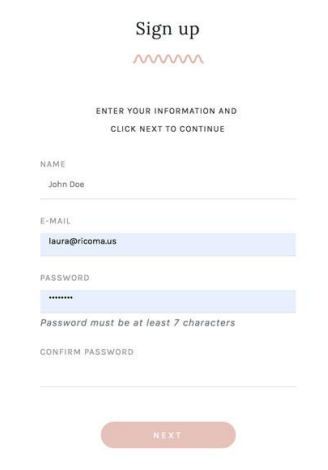
2. Then, enter your name, email, and create a password. Then, after confirming your password, click “NEXT” to continue.
3. Next, enter your promo code in this line.
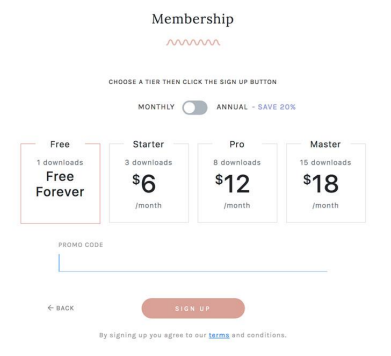
HoopMade will automatically recognize the tier that the promo code belongs to and will highlight it for you. This promotion is for the Master Tier. With the Master Tier, you will be able to download 15 designs per month and have access to premium designs, multiple formats, multiple size options, cap designs, and 3D puff designs for caps and patches.
4. Once a valid promo code is applied, enter your card number, expiration date and CVC in the "CREDIT OR DEBIT CARD" fields and click “SIGN UP”.
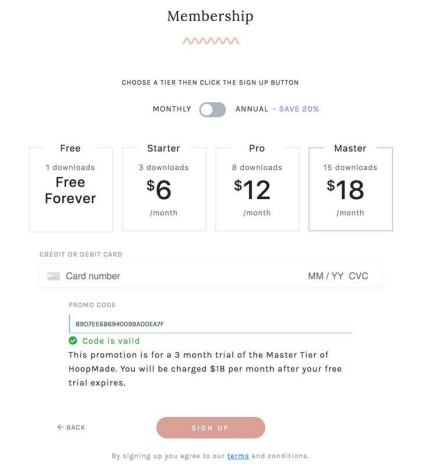
After 3 months, starting the day that you sign up with your promo code, you will get charged $18/month if you do not cancel your plan or downgrade to a free account (you can cancel or downgrade at any time). If you downgrade to another paid account, like Starter or Pro, you will then be charged the cost of that corresponding paid account, either $6/month or $12/month.
After you sign up, to access the library of designs, click on your name in the upper right-hand corner and click 'Library' or the Hoopmade logo.
For customers that ALREADY HAVE a Hoopmade account:
1. Once you receive your unique (one-time use) promo code, visit https://www.hoopmade.com/ and click 'Log In' in the upper right-hand corner.
2. Navigate to your name in the upper right-hand corner and then click 'Account'.
3. Click on 'My membership', and then select 'Apply a coupon'.
4. Enter your promo code and click 'Apply'. If you do not have a credit card on file, select the 'Click here to add a payment method'.
5. Enter your credit card information and hit 'Save', and then click 'Apply'.
Cancelling an account or downgrading to a free tier:
With a free tier, you will only be able to download one design per month and will not have access to premium designs, cap designs, 3D puff cap or patch designs.
CANCEL AN ACCOUNT: To cancel the subscription, simply navigate to your name in the upper right-hand corner and click 'Account'. Then navigate to 'My Membership' and click 'Cancel Paid Membership'. Next, select 'Downgrade Account'. After, confirm that you wish to downgrade by clicking 'DOWNGRADE' in the pop-up window.
DOWNGRADE TO FREE TIER: To downgrade to a free tier, simply navigate to your name in the upper right-hand corner and click 'Account'. Then navigate to 'My Membership' and click 'Change Plan'. Next, click on the free tier and select 'Downgrade Account'. After, confirm that you wish to downgrade by clicking 'DOWNGRADE' in the pop-up window.
Need additional help?
If you are still having trouble how to navigate or cancel your Hoopmade account...
Please don’t hesitate to reach out to us for further assistance via email at service@ricoma.com or by visiting our support page at www.ricoma.com/US/support.