DTF Printer Maintenance: Daily, Weekly, and Monthly Routines: Proper maintenance is essential to ensuring the longevity and optimal performance of your Direct-to-Film (DTF) printer. Regular upkeep not only improves print quality but also reduces downtime, prevents costly repairs, and delays premature part replacements to keep your printer running smoothly. It’s essential to follow a structured maintenance schedule that includes daily, weekly, and monthly tasks. Each of these maintenance routines targets different aspects of your printer, from cleaning printheads to checking key components, ensuring your equipment stays in top condition. In this article, we’ll break down the crucial maintenance tasks for DTF printers, outlining what needs to be done daily, weekly, and monthly to keep your printing operations running efficiently and trouble-free.
Daily Maintenance:
These tasks can be performed either before or after the start of daily production.
- Ensure Proper Environment
Humidity & Temperature:
Keep the Humidity above 45% relative Humidity; extensive time below this level will cause the Printhead
to dry out and clog the Printhead. A Non-condensing humidifier is recommended if you are unable to reach the necessary Humidity. The temperature must be between 59°F and 90°F; failure to maintain the correct temperature can cause clogging.
Follow the guidelines for your machine's particular white ink cycle needs:
DTF 2402T : White ink cycle – Ricoma
DTF 1202T : White ink cycle – Ricoma
DTF Aire : White ink cycle – Ricoma
- Inspect and Clean the Maintenance Station
Wipe Down the Head Wiper rubber: Use a cleaning solution and applicators or lint-free towels, clean the wiper located next to the maintenance station ink stacks.
Clean the Ink Pads/borders of the pad: The maintenance station’s ink pads should be checked for ink buildup. If they are saturated, carefully clean them with a lint-free towel. Be sure not to disturb their positioning.
Ensure the Print Head is Properly Aligned and Sealing with the Capping Pads
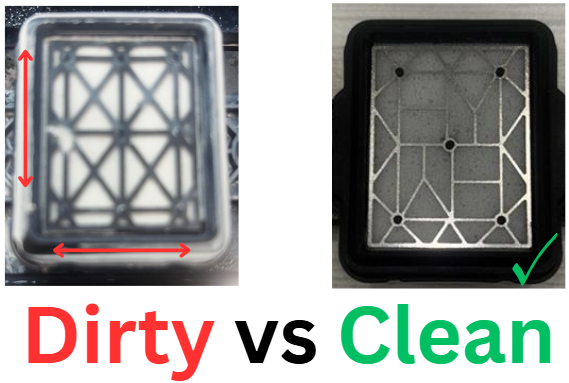
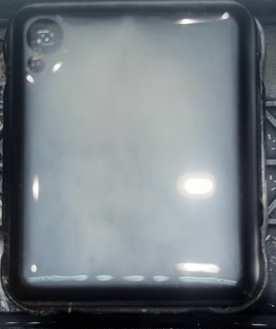
After cleaning the maintenance station, fill the ink stack pads with either moisturizing fluid or wet capping fluid, ensuring the pads are filled to the top. This ensures the liquid makes proper contact with the print head nozzles, keeping them moist and preventing clogs.
Weekly Maintenance:
The weekly maintenance will first include all the daily maintenance tasks, followed by some additional steps.
A clean and clear film path is essential to ensure smooth feeding of the DTF transfer film, preventing misprints, scratching, or jams. Inspect the entire film path, from the printer's ramp to the output roller, for any dust, ink buildup, or debris that could hinder the film’s movement. Remove any foreign material to maintain smooth operation and optimal print quality.
Clean the metal dusting roller bar and the compartment that holds your DTF powder (including the top lid and bottom drawer) using a dusting brush or a cleaning cloth.
Any visible dust or clumps should be siphoned out to prevent blockages or print inconsistencies. DTF powder typically lasts 3 to 6 months, depending on usage and proper maintenance, before it needs to be replaced. The timing of replacement is at the customer's discretion. Regularly check the powder level and refill it when it appears low, and replace it fully after extended use to ensure optimal print quality.
- Check Ink Quality/Consistency & Levels
Ink can degrade over time, impacting print quality. Inspect the ink tanks and lines for any signs of blockage, air gaps, or separation. If the ink appears thickened or isn't flowing smoothly, it's essential to flush the ink line and replace the ink.
Before refilling the ink tanks, gently shake the ink bottles to ensure the ink is well-mixed and consistent. Regularly check ink levels to avoid running low, and replace or top up ink when necessary to maintain optimal performance and print quality.
White Ink: It’s especially important to check the white ink regularly to ensure the motor is mixing it properly. If the white ink appears separated or clumpy, the motor may not be functioning as needed, and manual intervention or maintenance may be required to keep the ink flowing smoothly.
Monthly Maintenance:
The monthly maintenance will include all the daily and weekly maintenance tasks, along with additional steps for more in-depth care.
- Maintenance station sealing
Ensure the Print Head is Properly Aligned and Sealing with the Capping Pads. DTF (Direct-to-Film) Ink stacks or capping reservoirs on a maintenance station are considered consumables because they are components of the printing system that wear out or degrade over time, requiring regular replacement or maintenance
Why it’s important: Proper alignment of the printhead with the capping pads is essential for maintaining ink flow and preventing ink from drying inside the nozzles. Misalignment can cause ink to dry up, leading to clogging and poor print quality.
- Inspect and Lubricate labeled areas
Moving parts like rails can wear down over time without proper lubrication. Lubricate the labeled rails and labeled lubrication components with the appropriate lubricant (WHITE LITHIUM GREASE) to reduce friction and ensure smooth operation.
- White Ink Cycle Pump/Motor
It is essential to regularly check if the white ink cycle motor is working properly in your DTF printer, as the white ink is crucial. The white ink needs to be mixed and circulated consistently to prevent clumping or separation. If the motor isn't functioning as needed, the white ink may not flow smoothly, leading to poor print results, clogging, or even damage to the system. Ensuring the motor is operating correctly helps maintain the consistency of your prints and prevents costly maintenance issues down the road.
Below, you will find the article detailing the white ink cycle for your machine:
Cleaning and dusting off your DTF printer is essential to maintain optimal performance and print quality. Dust and debris can clog ink lines, disrupt the film path, cause printhead blockages, and even result in misprints or jams. Regular cleaning helps prevent these issues, ensures smooth operation, and extends the life of your printer. By keeping all components clean and dust-free, you can avoid costly repairs and maintain high-quality prints with minimal downtime.
Need additional help?
Please don’t hesitate to reach out to us for further assistance via email at or by visiting our support page at .
Was this article helpful?
0 out of 0 found this helpful