When you're having a problem with your machine, it can be difficult to know where to start troubleshooting. One of the first things to determine is whether the issue is mechanical or electrical.
To check this, turn off your machine by pressing the "Emergency Stop" button. Then, manually move the pantograph (the moving arm on your machine) to see if it moves smoothly.
If the pantograph doesn't move smoothly, the problem is likely mechanical. This could be caused by something getting stuck on the rail, or damage to other parts of the pantograph assembly. In this case, check for any obstructions on the rail and inspect other parts of the assembly for damage.
If the pantograph moves smoothly, the issue is likely electrical. One common electrical problem is a malfunctioning "limit sensor". This sensor tells the machine how far the pantograph should move and when to stop. If it's not working properly, the pantograph may not stop moving.
To troubleshoot any of these, we first have to expose the pentagraph:

To troubleshoot a mechanical issue, try resetting the machine and check the belts and pulleys, and make sure there's nothing blocking the rail. If you are unsure, you can send us pictures or a video to service@ricoma.com
To troubleshoot an electrical issue, we need to inspect the X-limit sensor making sure it is clean and in the right place:
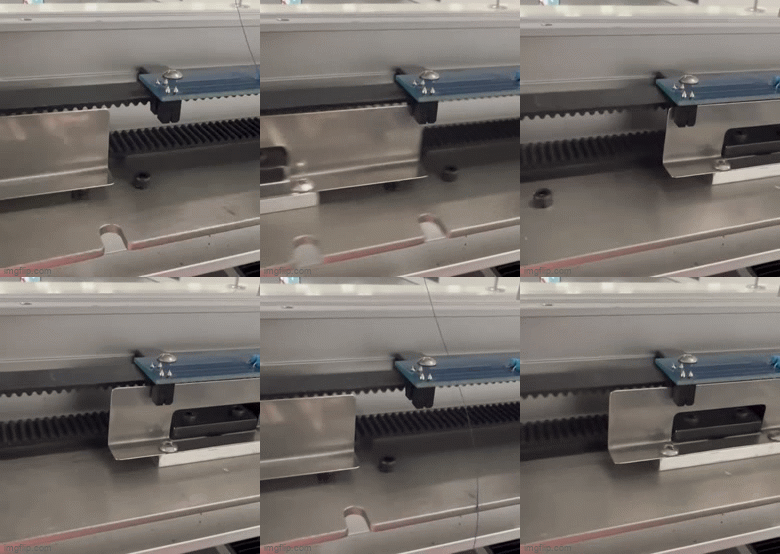

Make sure the metal piece is inside the black slit/s of the sensor. Turn on the machine after you've moved the pantograph, so the piece is inside the sensor. Try cleaning the black piece of the sensor using compressed air or isopropyl alcohol. You may also try unplugging the connections of the driver to the machine with the machine OFF. If you are unsure, you can send us pictures or a video to service@ricoma.com
If you need additional assistance, please refer below.
Please feel free to contact us via email at service@ricoma.com or visit our support page at www.ricoma.com/US/support for additional assistance.